Web App Security: A Developer's Guide to Content Security Policy (CSP)
Default configurations leave gaps. This post walks through how we implemented a strict Content Security Policy for JSON Ox, our JSON formatter and validator — and how you can apply the same principles to your own web app.
What is a Content Security Policy? #
A Content Security Policy (CSP) is a declarative security policy delivered as an HTTP response header sent from your server to the browser alongside your HTML. It functions as a strict security contract that the browser must enforce while rendering your page, ensuring it only executes code or loads resources from the trusted sources you have explicitly defined. The CSP standard is developed and maintained by the World Wide Web Consortium (W3C).
Without one, your application relies entirely on input sanitization to prevent unauthorized code execution. With a policy in place, your browser explicitly blocks unauthorized scripts and prevents data exfiltration, ensuring that even if an attacker successfully injects a payload, the browser will refuse to execute it or send data to an untrusted endpoint.
CSP Directives #
A CSP header is composed of individual directives. Each directive acts as a specific rule for a certain resource type. For example:
script-src 'self' https://trusted.com;
script-src: The directive (defines where scripts can load from).'self': A keyword allowing scripts from your own origin.https://trusted.com: An explicit allow-list for external sources.
You can find a full reference for every directive at content-security-policy.com.
Example of a CSP in action #
The following diagram illustrates how a CSP function as a defensive layer in your browser during a Cross-Site Scripting (XSS) attempt: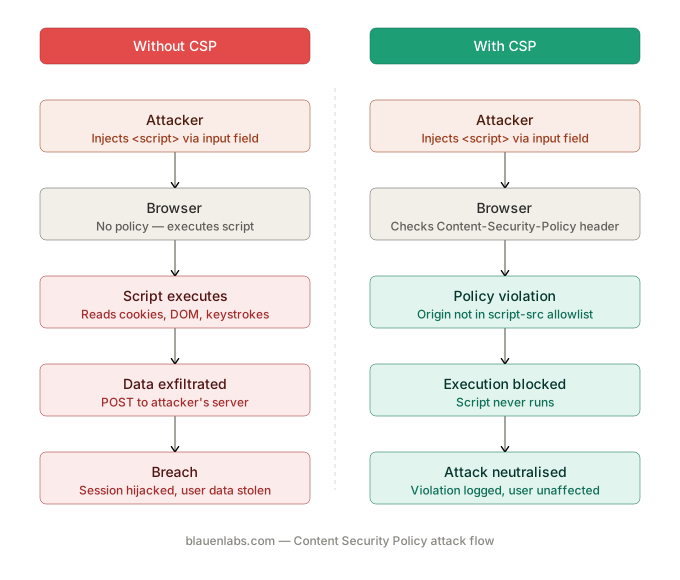
Vulnerabilities Addressed by a CSP #
A Content Security Policy (CSP) is a core technical control for several critical risks identified in the OWASP Top 10:2025. By shifting security enforcement to the browser, a CSP restricts the execution of untrusted code even when a vulnerability already exists in the application.
| OWASP 2025 Risk | Attack Type | CSP Directives |
|---|---|---|
| A05: Injection | Cross-Site Scripting (XSS) | script-src, object-src |
| A03: Supply Chain Failures | Formjacking / Skimming | connect-src, form-action |
| A02: Security Misconfiguration | Missing security headers | frame-ancestors, upgrade-insecure-requests |
Threat Breakdown #
A05:2025 – Injection (XSS) #
XSS involves injecting malicious scripts into trusted contexts. A strict CSP neutralizes this by banning unsafe-inline and limiting script-src to 'self'. If an injection vulnerability exists, the browser refuses to execute the unauthorized payload.
A03:2025 – Software Supply Chain Failures (Formjacking) #
Formjacking compromises frontend integrity via third-party scripts to skim form data — a supply chain attack delivered through a dependency you trusted. The connect-src and form-action directives act as a technical failsafe by whitelisting exactly where data can be sent. If a script is compromised, it cannot exfiltrate data to an unauthorized endpoint.
Clickjacking #
Clickjacking tricks users into unintended actions by overlaying a site in a hidden iframe. The frame-ancestors directive provides granular control over which domains are permitted to embed your application, rendering this attack vector ineffective.
A02:2025 – Security Misconfiguration #
Failing to implement a CSP is itself flagged under A02 as a failure to maintain standard security headers. The upgrade-insecure-requests directive addresses a specific misconfiguration — serving resources over HTTP from an HTTPS page — by automatically rewriting those requests to HTTPS, preventing cleartext interception.
Implementing a CSP #
Here are the core principles we applied to JSON Ox.
Ban inline scripts #
Removing unsafe-inline means the browser only executes scripts loaded from trusted external files. An attacker who manages to inject a <script> tag into your page gets nothing — the browser won't run it.
Restrict sources #
Allow scripts only from your own domain:
script-src 'self';
Not from everywhere:
script-src *;
The wildcard is effectively no policy at all.
Eliminate eval() #
Forbidding unsafe-eval prevents the app from turning user-provided strings into executable code — especially important for tools that process structured data formats like JSON.
Lock down connect-src #
The connect-src directive restricts which URLs your app can reach via fetch or XMLHttpRequest. For JSON Ox we set this to 'none' — the tool does everything locally, so there's no legitimate reason to make an outbound connection. Even if a dependency were compromised, it would have nowhere to send data.
Trusted Types #
Even with a strict CSP, certain browser APIs remain dangerous. Methods like innerHTML and document.write accept raw strings and inject them directly into the page — if that string contains malicious code, the browser will run it.
Trusted Types fixes this by forcing those APIs to only accept values that have been explicitly approved by a policy you write. Anything else gets blocked before it reaches the page.
You enable it with a single CSP directive:
require-trusted-types-for 'script';
But adding the directive alone will break your app. Every place in your code that writes directly to the DOM will start throwing errors until you've defined a policy that handles those writes safely. In practice, that means auditing your codebase, identifying every place a raw string is written to the page, and wrapping those operations behind a named policy that validates or sanitizes the value first.
It's more work upfront, but the result is that even if an attacker finds a way past your CSP, they still can't inject executable code into the page.
Note: Trusted Types is currently a W3C Working Draft, natively supported in Chromium-based browsers (Chrome, Edge). Firefox support is in progress. Treat it as a forward-looking defense layer rather than a primary control.
Auditing Your CSP #
Browser DevTools #
A CSP lives in the server response headers, not your source files. To inspect it:
- Open DevTools (
F12or right-click → Inspect) - Go to the Network tab
- Refresh the page
- Select the top document entry (your domain or
index.html) - Open the Headers tab and look for
content-security-policyunder Response Headers
SecurityHeaders.com #
SecurityHeaders.com scans your URL from the outside and grades your overall header implementation from A+ to F. It also flags missing protections like Strict-Transport-Security and X-Content-Type-Options, which fall outside CSP but matter for the same reasons.
Google CSP Evaluator #
CSP Evaluator is specifically focused on your CSP. Paste your URL and it returns a detailed report of gaps, misconfigurations, and high-severity vulnerabilities.
Reference #
- content-security-policy.com — complete directive reference
- Google CSP Evaluator — policy gap analysis
- SecurityHeaders.com — full header audit and grading
- Mozilla Observatory - analyzes a website’s HTTP headers and key security configurations