Web App Security: A Developer's Guide to Content Security Policy (CSP)
What a CSP is, why is it needed, how to implement it, and how to audit your web app.
Default configurations leave gaps. This post walks through how we implemented a strict Content Security Policy for Blauen Labs — first applied while building JSON Ox — and how you can apply the same principles to your own web app.
What is a Content Security Policy (CSP)? #
A Content Security Policy (CSP) is a declarative security policy delivered as an HTTP response header sent from your server to the browser alongside your HTML. It functions as a strict security contract that the browser must enforce while rendering your page, ensuring it only executes code or loads resources from the trusted sources you have explicitly defined. The CSP standard is developed and maintained by the World Wide Web Consortium (W3C).
Without one, your application relies entirely on input sanitization to prevent unauthorized code execution. With a policy in place, your browser explicitly blocks unauthorized scripts and prevents data exfiltration, ensuring that even if an attacker successfully injects a payload, the browser will refuse to execute it or send data to an untrusted endpoint.
A CSP header takes the form:
content-security-policy: <directive>; <directive>; <directive>
For real-world examples, see content-security-policy.com/examples.
CSP Directives #
A CSP header is composed of individual directives — each one a rule for a specific resource type. For example, script-src defines which origins are allowed to execute scripts:
content-security-policy: script-src 'self' https://cdn.example.com https://api.example.com;
script-src: The directive — defines which origins are allowed to execute scripts.'self': A keyword allowing scripts from your own origin.https://cdn.example.com: An explicit origin in the allowlist.
You can find a full reference for every directive at content-security-policy.com.
Example of a CSP in action #
The following diagram illustrates how a CSP function as a defensive layer in your browser during a Cross-Site Scripting (XSS) attempt:
Why is a CSP needed? #
A CSP addresses several of the OWASP Top 10:2025 risks by shifting enforcement to the browser — so even if a vulnerability exists, the damage is contained.
- XSS (Injection) — if an attacker injects a
<script>tag, the browser won't run it. - Formjacking — compromised third-party scripts can't exfiltrate form data to unauthorized endpoints.
- Clickjacking —
frame-ancestorscontrols which domains can embed your app in an iframe. - Mixed content —
upgrade-insecure-requestsrewrites HTTP resource loads to HTTPS automatically.
Before you start: Run your site through SecurityHeaders.com, Google CSP Evaluator, or Mozilla Observatory to get a baseline grade. Implement your policy, then run it again to see the improvement.
Implementing a CSP #
A CSP is set as an HTTP response header on your server. The core principle is simple: deny everything by default, then explicitly allow only what your app needs.
For most web apps, that means:
- No inline scripts — omit
unsafe-inlineso the browser only runs scripts loaded from trusted files, not injected<script>tags. - Restrict script sources — use
script-src 'self'to allow scripts from your own domain only. A wildcard (*) is effectively no policy at all. - No
eval()— omitunsafe-evalso user-provided strings can't be turned into executable code. - Lock down outbound connections — use
connect-srcto whitelist exactly where your app can send data viafetchorXMLHttpRequest.
For a full directive reference, see content-security-policy.com
Trusted Types #
Even with a strict CSP, certain browser APIs remain dangerous. Methods like innerHTML and document.write accept raw strings and inject them directly into the page — if that string contains malicious code, the browser will run it.
Trusted Types fixes this by forcing those APIs to only accept values that have been explicitly approved by a policy you write. Anything else gets blocked before it reaches the page.
You enable it with a single CSP directive:
content-security-policy: require-trusted-types-for 'script';
But adding the directive alone will break your app. Every place in your code that writes directly to the DOM will start throwing errors until you've defined a policy that handles those writes safely. In practice, that means finding every raw DOM write in your codebase and wrapping it in a named policy that validates or sanitizes the value first.
It's more work upfront, but the result is that even if an attacker finds a way past your CSP, they still can't inject executable code into the page.
Note: Trusted Types is currently a W3C Working Draft, natively supported in Chromium-based browsers (Chrome, Edge). Firefox support is in progress. Treat it as a forward-looking defense layer rather than a primary control.
Example CSP violation #
Here's what a CSP block looks like in practice — beacon.min.js is a Cloudflare analytics script injected at the CDN level. The policy blocked it because its origin wasn't in script-src, which is exactly the intended behaviour.
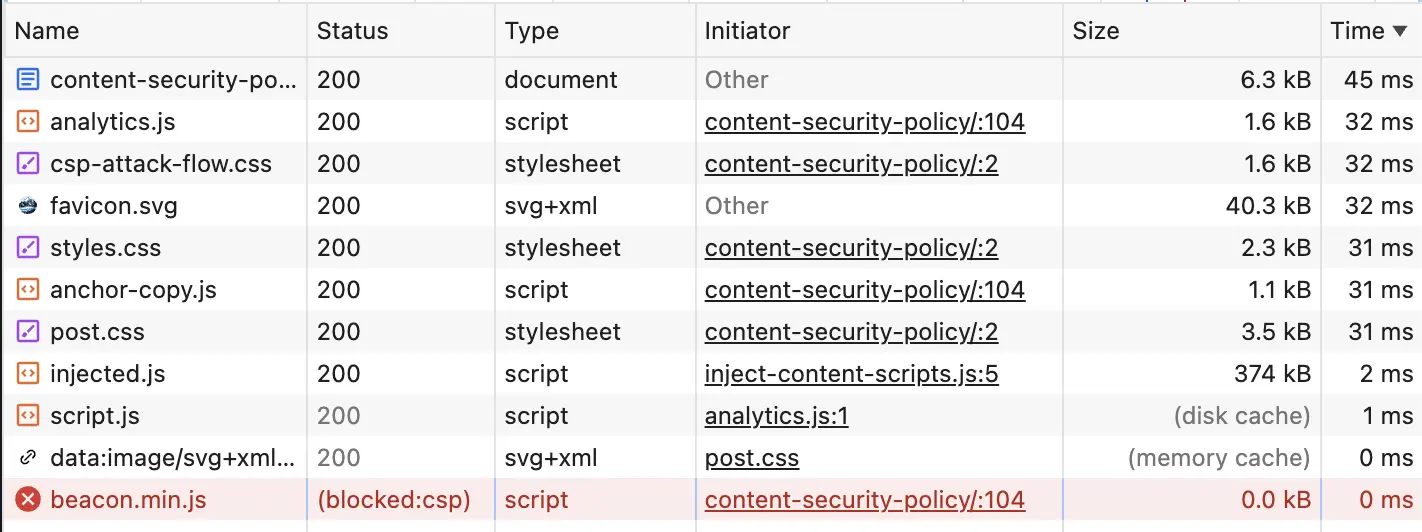
(blocked:csp), size is 0.0 kB, confirming no request was madeIf you see (blocked:csp), add the domain to the relevant directive (e.g. script-src) if it's intentional. If it isn't, the policy is doing its job.
Note: The Network tab logs every resource the browser attempted to load — scripts, stylesheets, images, and fetch calls — not just external requests.
Auditing Your CSP #
Browser DevTools #
A CSP lives in the server response headers, not your source files. To inspect it:
- Open DevTools (
F12or right-click → Inspect) - Go to the Network tab
- Refresh the page
- Select the top document entry (your domain or
index.html) - Open the Headers tab and look for
content-security-policyunder Response Headers
SecurityHeaders.com #
SecurityHeaders.com scans your URL from the outside and grades your overall header implementation from A+ to F. It also flags missing protections like Strict-Transport-Security and X-Content-Type-Options, which fall outside CSP but matter for the same reasons.
Google CSP Evaluator #
CSP Evaluator is specifically focused on your CSP. Paste your URL and it returns a detailed report of gaps, misconfigurations, and high-severity vulnerabilities.
Mozilla Observatory #
Mozilla Observatory covers a broader set of configurations than headers alone — including cookies, HTTPS setup, and subresource integrity — making it a useful complement to the other two tools.
Reference #
- content-security-policy.com — complete directive reference
- Google CSP Evaluator — policy gap analysis
- SecurityHeaders.com — full header audit and grading
- Mozilla Observatory - analyzes a website’s HTTP headers and key security configurations